
A party of four is standing on West Magnolia at 6:50 on a Friday, deciding where to eat. One of them has your restaurant open on their phone, thumb hovering, waiting for the hero shot of your brisket to paint in. It doesn’t. The spinner turns, the header jumps as an ad-heavy plugin finally loads, the menu is a PDF that won’t open. Four seconds in, they tap back to the map and walk into the place next door — the one whose site opened before they finished reading the name. You never had a chance to feed them, and you’ll never know they were there.
That’s not a design problem. It’s a speed problem, and it is the single most fixable leak on most Fort Worth restaurant websites. This is a straight, numbers-first playbook: why speed decides who fills the table, what “fast enough” actually means in 2026, and the exact five steps to get your site loading in under two seconds and passing Google’s Core Web Vitals — whether you fix it yourself or hand it to someone who builds fast by default.
Table of Contents
- The 30-second answer
- Why page speed decides who fills the table
- What “fast enough” means: Core Web Vitals in plain English
- The 5-step Fort Worth page-speed playbook
- Why your platform is probably the bottleneck
- The Fort Worth math: what two seconds is worth
- Frequently asked questions
The 30-Second Answer
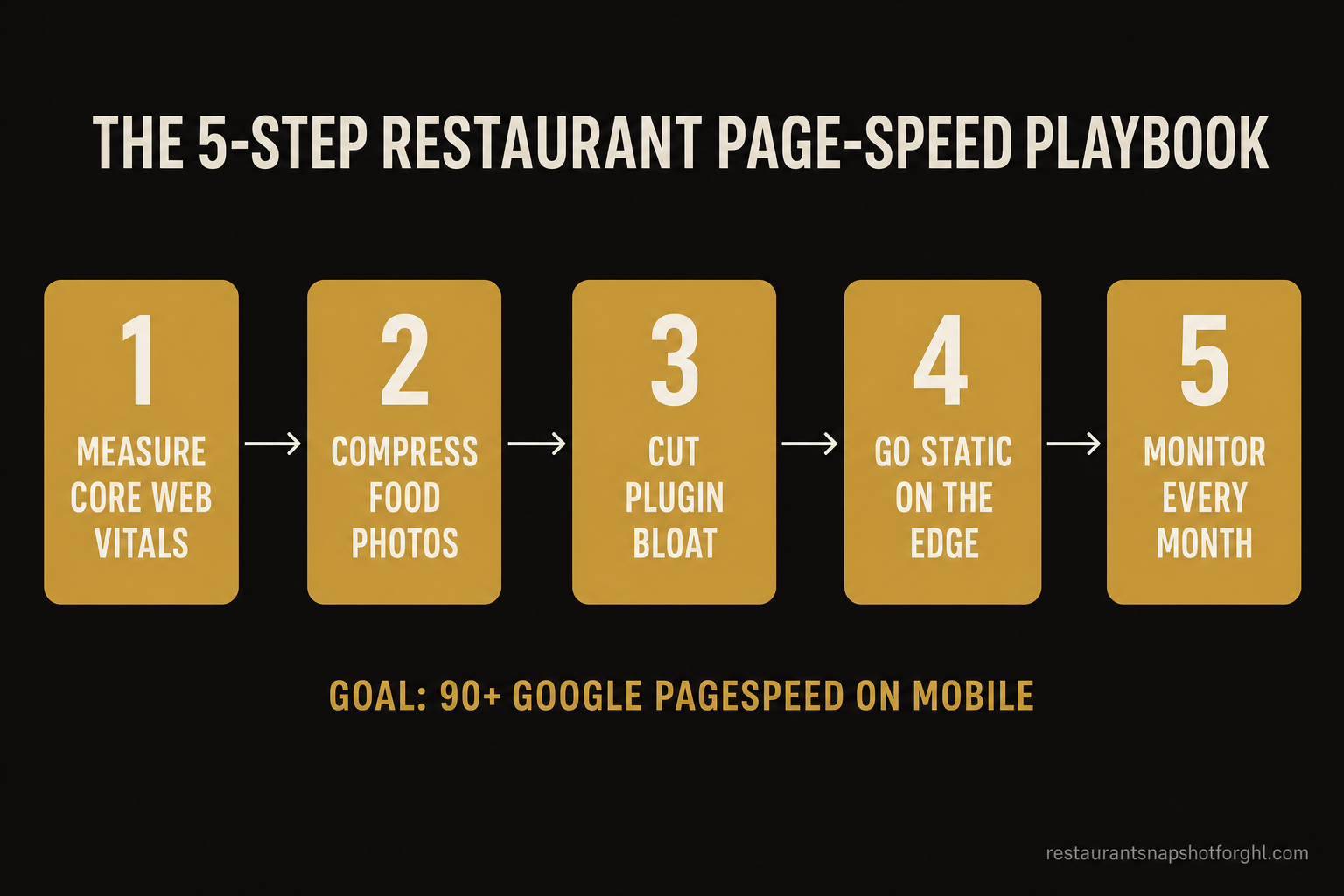
To get a Fort Worth restaurant website under two seconds, do five things in order: (1) measure your Core Web Vitals with Google PageSpeed Insights so you have a baseline; (2) compress and right-size your food photography and lazy-load everything below the fold; (3) strip out page-builder and plugin bloat that ships unused code; (4) serve static-first pages from a CDN edge instead of a database-driven page builder; and (5) re-check speed every month so it doesn’t quietly rot. The finish line is a Google PageSpeed score of 90+ on mobile and a “good” rating on all three Core Web Vitals.
The uncomfortable part: on WordPress, Wix, or a GoHighLevel funnel builder, steps 2–4 fight the platform the whole way. Those tools are built for flexibility, not for a hungry person on a phone outside your door. The most reliable path to a consistently fast restaurant site is a static-first framework built for speed from the first byte — which is exactly what the rest of this playbook walks through.
Why Page Speed Decides Who Fills the Table
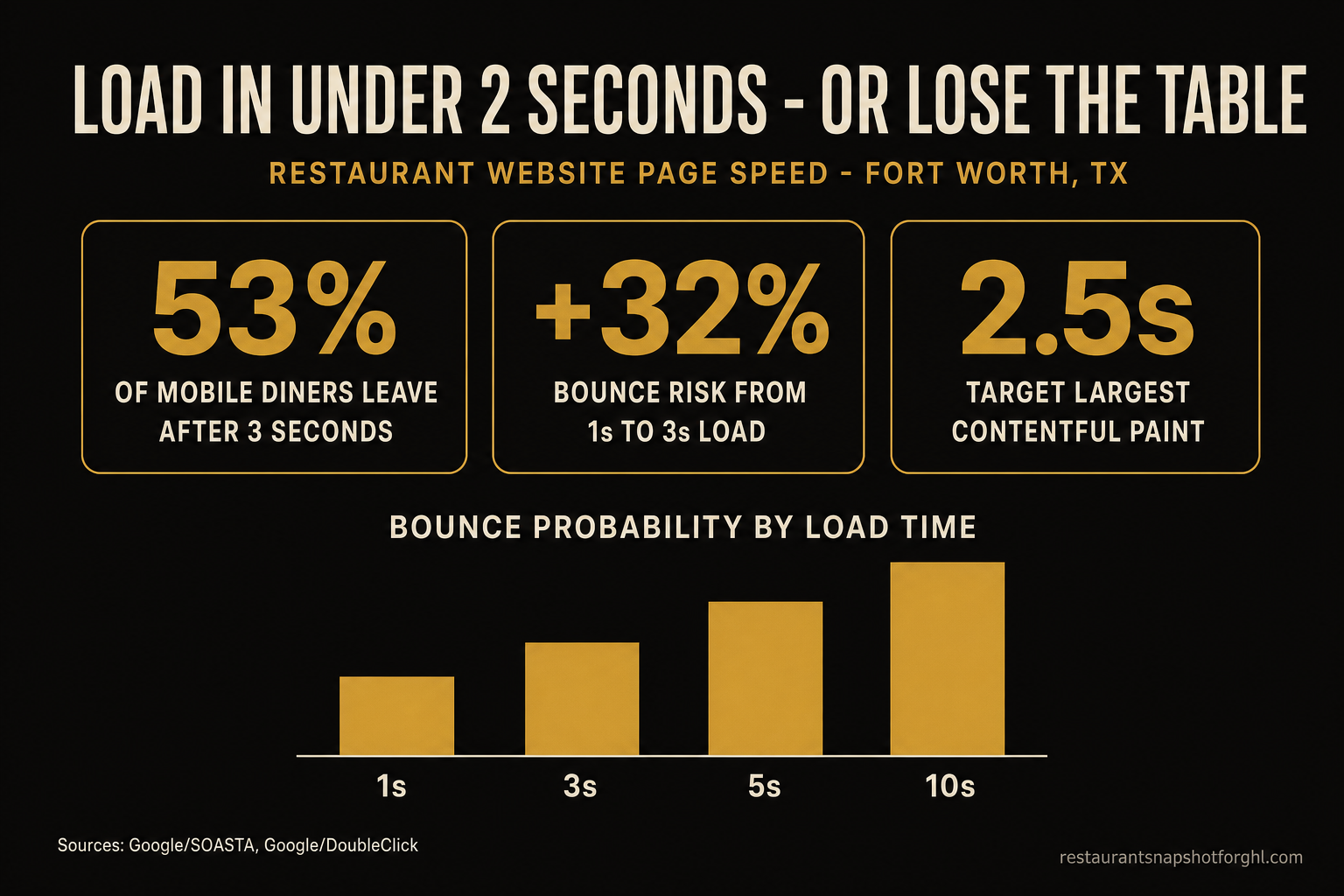
Restaurant demand is a phone in a hand, and it is impatient. The definitive number every operator should tattoo somewhere: 53% of mobile site visits are abandoned if the page takes longer than three seconds to load, per Google’s mobile-speed research (Google/DoubleClick). Half your would-be diners are gone before they see a single dish — not because the food looks wrong, but because nothing showed up fast enough to judge.
It gets steeper the slower you go. Google’s analysis of real mobile sessions with SOASTA found that as page load time rises, the probability that a visitor bounces climbs fast: +32% going from 1 to 3 seconds, +90% from 1 to 5 seconds, and +123% from 1 to 10 seconds (Google/SOASTA, 2017). Those aren’t rounding errors — they’re the difference between a full Friday and a quiet one.
There’s a money version of the same curve. Portent’s analysis of 94 million page views found the highest conversion rates land between 0 and 2 seconds — about a 3.05% ecommerce conversion rate under two seconds, versus 1.94% for pages loading in the 3–4 second range — with rates dropping roughly 4.42% for every additional second between 0 and 5 (Portent, 2022). And the effect is so sensitive that Deloitte and Google measured a 0.1-second improvement in mobile speed lifting retail conversions 8.4% and average order value 9.2% (Deloitte/Google, 2020). A restaurant reservation or an online order is the same kind of conversion — and it dies on the same slow pages.
Fort Worth is not a forgiving market to be slow in. Texas is home to more than 57,000 eating-and-drinking locations and about 1.4 million restaurant employees (National Restaurant Association, 2025) — and from Magnolia Avenue to the Stockyards to Sundance Square, a hungry guest has a dozen strong options inside a five-minute drive. When the choice comes down to whichever site loaded first, speed is not a nice-to-have. It’s the coin flip that decides the cover.
What “Fast Enough” Means: Core Web Vitals in Plain English
“Make it faster” is useless without a finish line. Google gives you one: Core Web Vitals, three real-user metrics that also feed search ranking. Here’s what each one means for a restaurant page, and the “good” threshold you’re aiming for (web.dev):
Google grades these at the 75th percentile of your real visitors, so a site that’s fast for you on office Wi-Fi can still fail for the guest on a phone with two bars outside your patio. All three have to be “good” to pass. The practical translation: your hero paints in under 2.5 seconds, taps respond instantly, and nothing jumps. Hit that, and you’ve cleared the bar that most restaurant sites in town quietly fail.
The 5-Step Fort Worth Page-Speed Playbook
Here’s the actual work, in the order that gives you the biggest wins first. You can run this on your current site; just know that on a heavy platform, steps 2–4 are a fight you’ll keep re-fighting.
Step 1 — Measure your Core Web Vitals (get a baseline)
Open Google PageSpeed Insights, paste your homepage and your menu page, and run the Mobile report. Write down three numbers: your Performance score (0–100) and your LCP, INP, and CLS. That’s your baseline — you can’t improve what you haven’t measured, and you’ll want the before/after to prove the work paid off. Re-test on a phone on cellular data, not just your laptop, because that’s where your guests actually are.
Step 2 — Compress and right-size your food photography
Food photography is heavy, and it’s almost always the reason LCP fails. The fixes, in order of impact:
- Serve modern formats. Convert JPEGs and PNGs to WebP or AVIF — typically 25–50% smaller at the same quality.
- Right-size the file. A hero image displayed at 1600px wide should not be a 4000px, 6 MB camera export. Resize before you upload.
- Lazy-load below the fold. Add
loading="lazy"to images that aren’t visible on first paint so they don’t block the hero. - Never ship a menu as a PDF. A PDF is slow, unreadable on a phone, and invisible to Google. Real, selectable text loads instantly and ranks.
This one step alone moves most restaurant sites from a failing LCP to a passing one.
Step 3 — Cut the plugin and page-builder bloat
Every plugin, tracking script, and page-builder widget adds JavaScript and CSS the browser has to download, parse, and run before the page feels ready — the stuff that wrecks INP and drags out load. Audit ruthlessly: remove plugins you don’t use, drop the third slider and the social-feed embed, and defer or delete tracking scripts you’re not actually reading. On WordPress especially, a stack of “just one more plugin” is usually the difference between a 40 and a 90.
Step 4 — Serve static-first pages from the edge
This is the structural fix that makes the others stick. A page builder assembles your page from a database on every single visit; a static-first site pre-builds the page once and serves a finished file from a CDN edge node close to the visitor. For a restaurant — whose content changes weekly, not per-second — that’s ideal: near-instant loads, nothing to hack, and no server to fall over on a Friday night. This is precisely why we build restaurant sites on the Astro framework served from the Cloudflare edge and guarantee a 90+ PageSpeed score, often a perfect 100, on both mobile and desktop.
Step 5 — Monitor it every month
Speed rots. A new photo, an added tracking pixel, a “quick” embed, and three months later you’re back to four seconds and don’t know why. Put a monthly reminder to re-run PageSpeed Insights on your top pages, and watch your Core Web Vitals field data in Google Search Console (it flags URLs that slip below “good”). Fast is a state you maintain, not a box you tick once.
Why Your Platform Is Probably the Bottleneck
You can do all five steps and still lose, because the platform underneath you is working against you. WordPress, Wix, and GoHighLevel funnel builders are flexible, general-purpose tools — and that flexibility ships as weight: page-builder overhead, plugin JavaScript, render-blocking scripts, and database calls on every load. You compress an image, and the theme adds two more scripts. It’s whack-a-mole.
A static-first stack flips the default. The page is fast because there’s almost nothing to load — no database round-trip, no builder runtime, just a finished HTML file from the edge. We go deeper on the platform trade-offs in Astro vs WordPress for restaurant websites and Astro vs Wix — but the short version is in the table below.
How a Fort Worth restaurant site loads, by platform
| Plan | Static-first (Astro on the edge) recommended | WordPress / Wix / GHL builder |
|---|---|---|
| Price | Fast by default | Fast if you fight for it |
| Feature 1 | Pre-built pages served from the Cloudflare edge — near-instant | Page assembled from a database on every visit |
| Feature 2 | 90+ PageSpeed guaranteed, often a perfect 100, mobile and desktop | Plugins and widgets add JavaScript that drags INP and LCP |
| Feature 3 | No plugin bloat or page-builder runtime to slow taps | Compress an image and the theme adds more scripts back |
| Feature 4 | Real menu text, not a PDF — loads instantly and ranks | Menus often shipped as slow, unreadable PDFs |
| Feature 5 | Nothing to patch, no server to crash on a Friday night | Charged to update tonight's specials or holiday hours |
| Feature 6 | Speed holds because there's almost nothing to load | Speed rots with every new plugin or embed |
| See how we build it → | The status quo |
None of this means you should rebuild your site on a whim. But if your PageSpeed score is stuck in the 30s–50s no matter how many images you compress, the platform is the ceiling — and moving to a build made for speed is usually cheaper than the covers you’re leaking every week. If you also want that fast site to actually get found, pair it with proper local SEO and Google Map Pack work, because Google rewards fast, well-structured pages in the rankings too.
The Fort Worth Math: What Two Seconds Is Worth
No revenue guarantees — just arithmetic you can run on your own numbers. Say your site gets 2,000 mobile visits a month from people deciding where to eat (modest for a well-reviewed Fort Worth spot on Magnolia or near the Stockyards). If your pages take four-plus seconds, the research says roughly half those visitors bounce before the hero even loads — call it 1,000 people gone. Cut load time so you retain even 5% more of them, that’s 100 additional engaged visitors a month. If just 10 of those book a table of two at a $45 average per-person check, that’s $900 a month in covers you were quietly leaking — recovered by making a page load faster, with zero extra ad spend.
Now compound it. A faster site also ranks better, converts more of your existing traffic (Portent’s ~4.42%-per-second curve cuts both ways), and turns your website into the reliable front door instead of the leaky one. Two seconds isn’t a vanity metric. It’s the cheapest table you’ll add all year.
If your problem runs deeper than a marketing site — a custom online-ordering flow, a reservations system wired into your POS, a multi-location portal — that’s an custom software build, and speed is baked into how we scope it. For most independents, though, a fast, purpose-built restaurant website is the whole fix.
Frequently Asked Questions
Restaurant website page speed — common questions
How fast should a restaurant website load?
Aim for under two seconds, and pass all three of Google's Core Web Vitals: Largest Contentful Paint under 2.5 seconds, Interaction to Next Paint under 200 milliseconds, and Cumulative Layout Shift under 0.1. Speed matters most on mobile, where 53% of visits are abandoned if a page takes longer than three seconds to load (Google/DoubleClick). A Google PageSpeed score of 90+ on the mobile report is a good practical finish line.
Why is my Fort Worth restaurant website so slow?
Usually one of three things: oversized food photography (huge, uncompressed JPEGs that blow your Largest Contentful Paint), plugin and page-builder bloat that piles on JavaScript, or a platform that rebuilds every page from a database on each visit. WordPress, Wix, and GoHighLevel funnel builders are especially prone to this. Run your homepage and menu page through Google PageSpeed Insights on the Mobile setting to see which one is dragging you down.
What are Core Web Vitals and do they affect my Google ranking?
Core Web Vitals are three real-user metrics Google uses to measure page experience: LCP (loading speed, target under 2.5s), INP (responsiveness, target under 200ms), and CLS (visual stability, target under 0.1). They are a confirmed ranking signal — Google rewards fast, stable pages — and just as importantly, they track the experience that decides whether a hungry visitor stays or bounces to a competitor.
Should I put my menu on my website as a PDF?
No. A PDF menu loads slowly, is hard to read and pinch-zoom on a phone, and is largely invisible to Google and AI answer engines. Publish your menu as real, selectable HTML text instead — it loads instantly, ranks for dish and cuisine searches, and lets you update a price in seconds rather than re-exporting a file.
Is it worth rebuilding my restaurant website just for speed?
If your PageSpeed score is stuck low no matter how many images you compress, the platform is your ceiling and a rebuild usually pays for itself in recovered covers. A static-first site built on a framework like Astro and served from a CDN edge is fast by default — pre-built pages, no plugin bloat, no database call per visit. We build exactly that and guarantee a 90+ PageSpeed score on mobile and desktop.
How do I keep my site fast after it launches?
Re-run Google PageSpeed Insights on your top pages once a month, and watch the Core Web Vitals report in Google Search Console, which flags URLs that slip below 'good.' Be disciplined about new additions — every plugin, tracking pixel, and embed adds weight. Speed is a state you maintain, not a one-time task.
Devon runs a small agency that builds and resells GoHighLevel systems to hospitality clients, from food trucks to fine dining. A former line cook turned funnel nerd, he’s obsessed with the unsexy plumbing of restaurant marketing: A2P 10DLC registration, two-way SMS, and the page-speed fundamentals that decide whether a hungry guest on a phone ever sees your menu. His posts lean technical without losing the operator who has to live with the system.
Related reading
- Astro vs WordPress for restaurant websites: the speed and SEO breakdown
- Astro vs Wix for restaurant websites in New York City
- Restaurant local SEO and the Google Map Pack
- How to add an AI chat widget to your restaurant website
- Building a restaurant online reservation system that fills tables
Sources
- Google / DoubleClick — The Need for Mobile Speed (53% abandon if load > 3s)
- Google / SOASTA — Mobile Page Speed New Industry Benchmarks (+32% / +90% / +123% bounce probability)
- web.dev (Google) — Web Vitals: LCP < 2.5s, INP < 200ms, CLS < 0.1
- Portent — Site Speed Is (Still) Impacting Your Conversion Rate (0–2s ≈ 3.05%, ~4.42%/sec drop)
- Deloitte / Google — Milliseconds Make Millions (0.1s gain → +8.4% retail conversion)
- National Restaurant Association — Texas Restaurant Industry (57,000+ locations, 1.4M employees)